2026 Daily Life Planner + Free 2027 & 2028 Daily Life Planner – Organized Me
Skip to content

ON SALE TODAY | ENDING SOON


    Sale Off
    2026 Daily Life Planner + Free 2027 & 2028 Daily Life Planner

    2026 Daily Life Digital Planner

    Instant Download | All Devices | Get 2027 & 2028 Free

    $96.85$27.95Save 71%

    Instant Download | All Devices | Get 2027 & 2028 Free

    $96.85$27.95Save 71%

    Keep track of appointments, medication notes, refill dates, bills, contacts, shopping lists, and daily reminders in one simple digital planner. 


    It feels familiar like paper planning, but lives on the devices you already use, so your planner and reminders can come with you when you leave the house.

    Limited Time Sale: Get 3 Years for the Price of 1! (Ending Soon)

    Limited Time Sale: Get 3 Years for the Price of 1! (Ending Soon)

    Limited Time Sale

    Get 3 Years for the Price of 1! 

    (Ending Soon)

    Keep track of appointments, medication notes, refill dates, bills, contacts, shopping lists, and daily reminders in one simple digital planner. 


    It feels familiar like paper planning, but lives on the devices you already use, so your planner and reminders can come with you when you leave the house.

    Limited Time Sale 

    Get 3 Years for the Price of 1! (Ending Soon)


    How will it help you?

    Appointments, refill dates, bills, shopping lists, phone numbers, birthdays, and little reminders can easily end up scattered across paper notes, calendar cards, phone reminders, and whatever you happen to have nearby.


    The Organized Me Daily Life Digital Planner gives you one familiar place to keep track of the things you don't want slipping through the cracks.

    You can write things down like you would in a paper planner, use simple daily planning pages for the things you actually need to remember, and set Apple or Google Calendar reminders for appointments, refills, bills, birthdays, and anything else you want to be notified about.

    So instead of trying to remember where you wrote something down, you can keep your plans, notes, lists, and reminders together in one planner that comes with you.
    What’s Inside The Daily Life Digital Planner?
    Inside, you’ll get the 2026 Daily Life Digital Planner built to help you keep track of appointments, reminders, daily plans, notes, lists, and the important details you don’t want to lose.

    Your planner includes monthly, weekly, and daily planning pages, plus simple daily-life pages for medication notes, refill dates, doctor visit questions, health contacts, important contacts, bills, birthdays, anniversaries, shopping lists, and daily routines.

    Both Sunday and Monday start options are included. Along with a step-by-step tutorial (video and PDF formats provided), so you can start planning straight away.

    Simply download your new planner onto your iPhone or iPad and import it into an app below:
    IOS: GoodNotes/Notability/Noteshelf
    • 2026 Daily Life Digital Planner
      Dated: January 2026 to December 2026
    • 2027 Daily Life Digital Planner
      Dated: January 2027 to December 2027
    • 2028 Daily Life Digital Planner
      Dated: January 2028 to December 2028
    • Option of planner with Apple Calendar links or Google Calendar links (both included)
    • Option of Sunday Start or Monday Start Daily Planner (both included)
    • Daily Planning Pages | Schedule, meals, priorities, to-dos, medication reminders and notes
    • Weekly Planning Pages | Priorities, appointments, to-do lists and notes
    • 2026 Yearly Calendar

    • Monthly Calendars | Appointments, birthdays, bills, refill dates and reminders
    • Yearly Overview

    • Medication Pages | Medication notes, doses, refill dates and prescription numbers
    • Health Pages | Health contacts, emergency contacts, doctor visits and appointment notes
    • Everyday Life Pages | Bills, shopping lists, routines, birthdays and anniversaries
    • Important Contacts | Family, friends, services, doctors, pharmacy and emergency contacts
    • Note Taking Templates | Blank, lined, grid, dotted and Cornell notes that can be duplicated
    • Your choice of 4 Covers
    • Installation Tutorial Video (easy installation)
    How to use

    Simply import into an app below

    Simply import into:

    GoodNotes 

    (free)

    Notability

    + Step by step Installation and user guide provided.

    You can also use our planner on E Ink devices like:

    GoodNotes 

    (free)

    Notability

    Step by step Installation and user guide provided.

    You can also use our planner on E Ink devices like:

    reMarkable

    Supernote

    reMarkable

    Supernote


    6 Reasons The Daily Life Digital Planner Makes Life Easier To Keep Track Of

    Take your planning game to the next level!

    • Set Reminders
    • Hyperlink Navigation
    • Device Syncing
    • Handwriting to Text
    • Ultimate Tool Bar
    • Data Saving

    Set your reminders

    Set reminders for appointments, meetings, tasks, and anything else you need so you never miss anything important again.


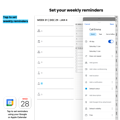
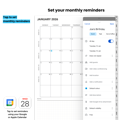
    How? Our planner includes links to Google and Apple Calendar, allowing you to pull up the exact date and time in your external calendar. This enables you to set monthly, weekly, and daily reminders with hour intervals.

    Hyperlink Navigation

    Simply tap the page prompts and instantly jump between sections within your planner. No more flipping through pages to find what you need.

    Sync your devices

    Enjoy automatic updates across all your devices, granting you access to your planner whenever you need it. Seamlessly switch between devices and stay in sync with your planner.

    Convert your handwriting to text

    Messy hand writers, we’ve got your back! Effortlessly write in your planner, and like magic, it seamlessly converts into neatly typed text.

    • Write

    • Type

    • Highlight

    • Erase

    • Undo

    • Plan with stickers

    • Copy and Paste

    • Insert Images

    Ultimate tool bar

    Customize your planner effortlessly with all the essential tools at your fingertips. Write, type, highlight, erase and more. Experience the best of both worlds with the familiar feel of a paper planner and the enhanced benefits of a digital planner. Unleash your creativity and make your planner truly your own.

    Save your data

    We understand the pain of losing important paper notes. Fear not, the Organized Me Digital Planner automatically saves to your device or preferred cloud storage, safeguarding your precious planner entries and upcoming dates.

    Everything You Need To Keep Daily Life Organized

    • Set Reminders
    • Hyperlink Navigation
    • Device Syncing
    • Handwriting to Text
    • Ultimate Tool Bar
    • Data Saving

    Set your reminders

    Set reminders for appointments, refill dates, bills, birthdays, errands, and the daily details you don’t want slipping through.


    The Daily Life Digital Planner includes Apple and Google Calendar links, so you can open the exact date and time in your external calendar and set reminders when you need them.
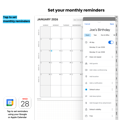

    You can add monthly, weekly, daily, and hourly reminders, helping you stay on top of the important things you’ve written in your planner.

    Hyperlink Navigation

    Simply tap the page prompts and instantly jump between sections within your planner so you don’t need to flip through pages to find what you need.

    Sync your devices

    Enjoy automatic updates across all your devices, granting you access to your planner whenever you need it. Seamlessly switch between devices and stay in sync with your planner.

    Convert your handwriting to text

    Messy hand writers, we’ve got your back! Effortlessly write in your planner, and like magic, it seamlessly converts into neatly typed text.

    • Write

    • Type

    • Highlight

    • Erase

    • Undo

    • Plan with Stickers

    • Copy and Paste

    • Insert Images

    All the tools you need to plan

    Write, type, highlight, erase, undo, copy and paste, add stickers, or insert images when you need to.


    The Daily Life Digital Planner gives you the familiar feel of writing things down, with the helpful tools that make digital planning easy to use day to day.


    You can keep your plans neat, make quick changes, add notes, and update your planner without it turning into a mess.

    Save your data

    We understand the pain of losing important paper notes. Fear not, the Organized Me Digital Planner automatically saves to your device or preferred cloud storage, safeguarding your precious planner entries and upcoming dates.

    Take your planning game to the next level!

    Set Reminders

    Set your reminders

    Set reminders for appointments, refill dates, bills, birthdays, errands, and the daily details you don’t want slipping through.


    The Daily Life Digital Planner includes Apple and Google Calendar links, so you can open the exact date and time in your external calendar and set reminders when you need them.
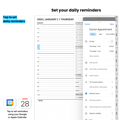

    You can add monthly, weekly, daily, and hourly reminders, helping you stay on top of the important things you’ve written in your planner.

    Hyperlink Navigation

    Hyperlink Navigation

    Simply tap the page prompts and instantly jump between sections within your planner so you don’t need to flip through pages to find what you need.

    Device Syncing

    Sync your devices

    Enjoy automatic updates across all your devices, granting you access to your planner whenever you need it. Seamlessly switch between devices and stay in sync with your planner.

    Handwriting to Text

    Convert your handwriting to text

    Messy hand writers, we’ve got your back! Effortlessly write in your planner, and like magic, it seamlessly converts into neatly typed text.

    Ultimate Tool Bar

    • Write

    • Type

    • Highlight

    • Erase

    • Undo

    • Plan with stickers

    • Copy and Paste

    • Insert Images

    Ultimate tool bar

    Write, type, highlight, erase, undo, copy and paste, add stickers, or insert images when you need to.


    The Daily Life Digital Planner gives you the familiar feel of writing things down, with the helpful tools that make digital planning easier to use day to day.


    You can keep your plans neat, make quick changes, add notes, and update your planner without it turning into a mess.

    Data Savings

    Save your data

    We understand the pain of losing important paper notes. Fear not, the Organized Me Digital Planner automatically saves to your device or preferred cloud storage, safeguarding your precious planner entries and upcoming dates.

    Ready to plan in 3 simple steps

    1. Download your Planner pack

    You will receive a downloadable link with your planner, stickers, and installation tutorial immediately after placing your order.

    2. Download a note taking app

    Bring your planner to life with a note-taking and annotation app! For the best experience, import your planner into GoodNotes (free). It's enhanced user interface sets it apart from alternatives.


    3. You're Ready to plan

    The installation video and PDF Installation Guide are easy to follow so you'll be set up and ready to plan and make progress within 10 minutes of placing your order!

    Ready to plan in 3 simple steps

    1. Download your Planner pack

    You will receive a downloadable link with your planner, stickers, and installation tutorial immediately after placing your order.

    2. Download a note taking app

    Bring your planner to life with a note-taking and annotation app! For the best experience, import your planner into GoodNotes (free). It's enhanced user interface sets it apart from alternatives.


    3. You're Ready to plan

    The Installation Video and PDF Installation Guide are easy to follow so you'll be set up and ready to plan and make progress within 10 minutes of placing your order!

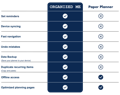
    Let's Compare...

    What Our Customers Say

    Daily Planner Reviews

    What Our Customers Say

    Daily Planner Reviews

    ×

    Frequently Asked Questions

    What is a digital planner?

    Imagine the versatility of a paper planner, now without any boundaries. The Organized Me Digital Planner offers the familiarity of a traditional planner while harnessing the power of technology. It comes in the form of an interactive PDF, perfect for use on your smart devices.


    To maximize your Digital Planner's potential, pair it with the GoodNotes PDF-annotation app. Simply import your planner into GoodNotes (free), and you're ready to start planning efficiently and effortlessly.


    Effortless Protection: By using an app like GoodNotes, your changes are automatically saved. Even if your device is lost or damaged, your important planning data remains secure and easily accessible.


    Welcome to the Future of Planning: Embrace the convenience, flexibility, and enhanced features of digital planning. With the Organized Me Digital planner, you'll experience a dynamic and efficient approach to staying organized and productive.

    What will happen after I purchase?

    After purchasing, an 'Order Confirmation' will be instantly sent to the email you used to purchase your planner. The email will feature a link that will send you to a page where you will be able to download your planner.


    In addition to your planner pack, the email will feature a tutorial video that will show you how to transfer your planner and stickers to your planning app. Don't worry, if you have never used a digital planner before its easy to install and we're only an email away if you have any issues.

    Is your planner compatible with reMarkable and Supernote?

    Yes, our planner is compatible with E Ink Tablets like reMarkable and Supernote. 


    Many of our customers choose to use their planner on devices like the reMarkable and the feedback is great. 


    To use our planner on a tablet like a reMarkable, all you need to do is import your planner as you would an ordinary PDF. All of the features such as the hyperlinks are compatible on the reMarkable and other devices.

    How does your planner work with Google and Apple Calendar?

    Our planner features links to Google and Apple Calendar that pull up the time and date in your external calendar, enabling you to set monthly, weekly, and daily (hourly) reminders.

    What apps can I use your planner on?

    We recommend using your planner within the GoodNotes app (free). GoodNotes offers an exceptional user-friendly interface and a range of features that truly enhance your planning experience.


    Why GoodNotes?

    Seamless Integration: Our planners are designed to seamlessly integrate with GoodNotes, allowing you to enjoy a smooth and interactive planning experience.


    Enhanced Features: GoodNotes provides an array of advanced features to assist you with ensuring an exceptional planning experience.


    Continuous Updates: By choosing GoodNotes, you'll benefit from regular updates and improvements that further enrich your planning experience.


    While there are alternative apps available, we stand by GoodNotes as the optimal choice for making the most of your planner. Your planning journey deserves a tool that's reliable, feature-rich, and constantly evolving – that's why we recommend using your Organized Me Digital Planner within GoodNotes.

    Is your planner a subscription?

    No, once you purchase your planner it is yours to use freely on as many devices as you require. We will not charge you a subscription or hidden fee.

    What currency are your prices in?

    Our website automatically adjusts the currency based on your location. This means that the price displayed will be in your local currency (e.g. if you are located in the US, the currency will automatically change to USD).

    What devices is your planner compatible with?

    Our planners are compatible with all devices, including those running on IOS, Android, and Windows. When you place your order, you will receive an order pack that includes an Installation and User Guide for Android, Windows, and Apple devices.


    We frequently update our user guides to include photo examples that align with the most recent system updates.

    Will I be able to use the planner on my iPhone, iPad, Mac, and Windows computer?

    Yes, you will be able to sync your planner across your iPhone, iPad, Mac, and Windows computer.


    For example, if you are using iOS devices and a Windows computer, you will be able to download your planner and import it into GoodNotes on your iPad. Then, you can download GoodNotes onto your iPhone and computer, and your planner will sync between all three of your devices.


    When you place your order, you will receive an order pack that includes an Installation and User Guide for Android, Windows, and Apple devices. There is a section within the User Guide that will show you how to do this.

    Will I be able to use the planner on my Android phone, tablet, and Windows computer?

    Yes, you will be able to sync your planner across your Android devices and your Windows computer.


    For example, if you are using Android devices and a Windows computer, you will be able to download your planner and import it into Samsung Notes (free) on your tablet. Then, you can download Samsung Notes onto your phone and computer, and your planner will sync between all three of your devices.


    When you place your order, you will receive an order pack that includes an Installation and User Guide for Android, Windows, and Apple devices. There is a section within the User Guide that will show you how to do this.

    Is your planner functional in all countries?

    Yes, our planner is compatible worldwide, and we have customers from all corners of the globe.

    How do I get in contact with you?

    Feel free to send us an email at customersupport@organizedme.com.au. Our customer service team will be more than happy to assist you with any query you may have.


    We also love feedback! If you have any recommendations we would love to hear them as we are always looking for ways to help our customers even more 😊

    Do you have a Money Back guarantee

    Customer satisfaction is extremely important to us. If for any reason you are unable to download your planner onto your device, please contact our friendly customer support team for a full refund!

    Ready to make daily life easier to keep track of?

    Download the Daily Life Digital Planner and start keeping your appointments, reminders, medication notes, bills, contacts, lists, and everyday details in one familiar planner you can take with you.

    Ready To Make Family 

    Planning Feel Easier? 

    Download the Organized Me Digital Planner and keep your schedule, appointments, groceries, and daily plans together in one place that is always within reach.

    Ready to start making progress?

    Download the Organized Me Digital Planner and experience the change for yourself!