2026 Mom Planner + Free 2027 & 2028 Mom Planner – Organized Me
Skip to content

ON SALE TODAY | ENDING SOON


    Sale Off
    2026 Mom Planner + Free 2027 & 2028 Mom Planner

    2026 Mom Digital Planner

    Instant Download | All Devices | Get 2027 & 2028 Free

    $87.85$24.95Save 72%

    Instant Download | All Devices | Get 2027 & 2028 Free

    $87.85$24.95Save 72%

    Keep your family organized with a planner that feels like paper, but lives on your devices.


    Plan school events, appointments, permission slips, and to-dos in one place, and add anything the moment plans change while you're out. 


    For the things you really can't miss, you can set a reminder the second you write it down.

    Limited Time Sale: Get 3 Years for the Price of 1! (Ending Soon)

    Limited Time Sale: Get 3 Years for the Price of 1! (Ending Soon)

    Limited Time Sale

    Get 3 Years for the Price of 1! 

    (Ending Soon)

    Keep your family organized with a planner that feels like paper, but lives on your devices.


    Plan school events, appointments, permission slips, and to-dos in one place, and add anything the moment plans change while you're out. 


    For the things you really can't miss, you can set a reminder the second you write it down.

    Limited Time Sale 

    Get 3 Years for the Price of 1! (Ending Soon)


    How will it help you?


    Your family's schedule doesn't stop changing when you leave the house. Appointments get booked at the front desk, plans get made in the pickup line, and school dates land in your inbox at random times. You tell yourself you'll add it tonight, but by tonight it's buried under everything that came in after it.

    The Organized Me Mom Planner gives you one familiar place for all of it. You write things down the way you always have, on planning pages made for family life. And because your planner is on your iPad and phone, you can add things the moment they come up.

    For the things you really can't afford to miss, like permission slips and school events, you can set Apple or Google Calendar reminders right from the page.

    So instead of hoping you'll remember, or trying to find where you wrote something down, your family's whole schedule is in one planner that's actually with you.
    What’s Inside the Mom Planner?
    Inside, you'll get the 2026 Mom Digital Planner built to help you keep track of your family's schedule, school details, appointments, health notes, meals, bills, and the important details you don't want to lose.

    Your planner includes monthly, weekly, and daily planning pages, plus family-life pages for school and childcare details, illness and symptom logs, doctor visits, birthdays, household maintenance, meal plans, grocery lists, bills, and family contacts.

    Both Sunday and Monday start options are included. Along with a step-by-step tutorial (video and PDF formats provided), so you can start planning straight away.

    Simply download your new planner onto your iPhone or iPad and import it into an app below:

    IOS: GoodNotes/Notability/Noteshelf
    • 2026 Mom Digital Planner
      Dated: January 2026 to December 2026
    • 2027 Mom Digital Planner
      Dated: January 2027 to December 2027
    • 2028 Mom Digital Planner
      Dated: January 2028 to December 2028
    • Option of planner with Apple Calendar links or Google Calendar links (both included)
    • Option of Sunday Start or Monday Start Mom Planner (both included)
    • Daily Planning Pages | Schedule, priorities, to-dos, do-not-forgets, meals and notes
    • Weekly Planning Pages | Priorities, to-dos, appointments and weekly notes
    • Monthly Calendars | School events, appointments, birthdays, bills and reminders
    • Yearly Family Overview | School terms, holidays, appointments and health checks

    • School and Childcare Page | Each child's school, teachers, absence contacts, pick-up people and activities

    • Family Health Pages | Illness and symptoms log, family doctor visits, medications and allergies, and health contacts
    • When Did I Last + Household Maintenance | Home and family jobs, providers, costs and due dates
    • Everyday Family Pages | Birthdays, bills and budget, meal plans, grocery lists, routines and family task list
    • Important Contacts | Family, friends, services, emergency and school contacts
    • Note Taking Templates | Blank, lined, grid, dotted and Cornell notes that can be duplicated
    • Your choice of 4 Covers
    • Installation Tutorial Video (easy installation)
    How to use

    Simply import into an app below

    Simply import into:

    GoodNotes 

    (free)

    Notability

    + Step by step Installation and user guide provided.

    You can also use our planner on E Ink devices like:

    GoodNotes 

    (free)

    Notability

    Step by step Installation and user guide provided.

    You can also use our planner on E Ink devices like:

    reMarkable

    Supernote

    reMarkable

    Supernote


    6 Reasons Mothers Are Choosing The Mom Digital Planner

    Everything You Need To Keep Family Life Organized

    • Set Reminders
    • Hyperlink Navigation
    • Device Syncing
    • Handwriting to Text
    • Ultimate Tool Bar
    • Data Saving

    Set your reminders

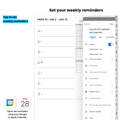
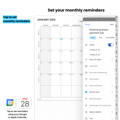
    Set reminders for school events, permission slips, appointments, birthdays, and the family details you don't want slipping through.


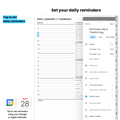
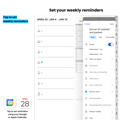
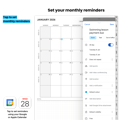
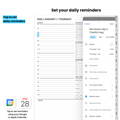
    The Mom Planner includes Apple and Google Calendar links, so you can open the exact date and time in your external calendar and set reminders when you need them.


    You can add monthly, weekly, daily, and hourly reminders, helping you stay on top of the important things you’ve written in your planner.

    Hyperlink Navigation

    Simply tap the page prompts and instantly jump between sections within your planner so you don’t need to flip through pages to find what you need.

    Sync your devices

    Enjoy automatic updates across all your devices, granting you access to your planner whenever you need it. Seamlessly switch between devices and stay in sync with your planner.

    Convert your handwriting to text

    Messy hand writers, we’ve got your back! Effortlessly write in your planner, and like magic, it seamlessly converts into neatly typed text.

    • Write

    • Type

    • Highlight

    • Erase

    • Undo

    • Plan with stickers

    • Copy and Paste

    • Insert Images

    All the tools you need to plan

    Write, type, highlight, erase, undo, copy and paste, add stickers, or insert images when you need to.


    The Mom Planner gives you the familiar feel of writing things down, with the helpful tools that make digital planning easier to use day to day.


    You can keep your plans neat, make quick changes, add notes, and update your planner without it turning into a mess.

    Save your data

    We understand the pain of losing important paper notes. Fear not, the Organized Me Mom Digital Planner automatically saves to your device or preferred cloud storage, safeguarding your precious planner entries and upcoming dates.

    Everything You Need To Keep Family Life Organized

    • Set Reminders
    • Hyperlink Navigation
    • Device Syncing
    • Handwriting to Text
    • Ultimate Tool Bar
    • Data Saving

    Set your reminders

    Set reminders for school events, permission slips, appointments, birthdays, and the family details you don't want slipping through.


    The Mom Planner includes Apple and Google Calendar links, so you can open the exact date and time in your external calendar and set reminders when you need them.


    You can add monthly, weekly, daily, and hourly reminders, helping you stay on top of the important things you’ve written in your planner.

    Hyperlink Navigation

    Simply tap the page prompts and instantly jump between sections within your planner so you don’t need to flip through pages to find what you need.

    Sync your devices

    Enjoy automatic updates across all your devices, granting you access to your planner whenever you need it. Seamlessly switch between devices and stay in sync with your planner.

    Convert your handwriting to text

    Messy hand writers, we’ve got your back! Effortlessly write in your planner, and like magic, it seamlessly converts into neatly typed text.

    • Write

    • Type

    • Highlight

    • Erase

    • Undo

    • Plan with Stickers

    • Copy and Paste

    • Insert Images

    All the tools you need to plan

    Write, type, highlight, erase, undo, copy and paste, add stickers, or insert images when you need to.


    The Mom Planner gives you the familiar feel of writing things down, with the helpful tools that make digital planning easy to use day to day.


    You can keep your plans neat, make quick changes, add notes, and update your planner without it turning into a mess.

    Save your data

    We understand the pain of losing important paper notes. Fear not, the Organized Me Mom Digital Planner automatically saves to your device or preferred cloud storage, safeguarding your precious planner entries and upcoming dates.

    Everything You Need To 

    Keep Family Life Organized

    Set Reminders

    Set your reminders

    Set reminders for school events, permission slips, appointments, birthdays, and the family details you don't want slipping through.


    The Mom Planner includes Apple and Google Calendar links, so you can open the exact date and time in your external calendar and set reminders when you need them.


    You can add monthly, weekly, daily, and hourly reminders, helping you stay on top of the important things you’ve written in your planner.

    Hyperlink Navigation

    Hyperlink Navigation

    Simply tap the page prompts and instantly jump between sections within your planner so you don’t need to flip through pages to find what you need.

    Device Syncing

    Sync your devices

    Enjoy automatic updates across all your devices, granting you access to your planner whenever you need it. Seamlessly switch between devices and stay in sync with your planner.

    Handwriting to Text

    Convert your handwriting to text

    Messy hand writers, we’ve got your back! Effortlessly write in your planner, and like magic, it seamlessly converts into neatly typed text.

    All the tools you need to plan

    • Write

    • Type

    • Highlight

    • Erase

    • Undo

    • Plan with stickers

    • Copy and Paste

    • Insert Images

    All the tools you need to plan

    Write, type, highlight, erase, undo, copy and paste, add stickers, or insert images when you need to.


    The Mom Planner gives you the familiar feel of writing things down, with the helpful tools that make digital planning easier to use day to day.


    You can keep your plans neat, make quick changes, add notes, and update your planner without it turning into a mess.

    Data Savings

    Save your data

    We understand the pain of losing important paper notes. Fear not, the Organized Me Mom Digital Planner automatically saves to your device or preferred cloud storage, safeguarding your precious planner entries and upcoming dates.

    Ready to plan in 3 simple steps

    1. Download your Planner pack

    You will receive a downloadable link with your planner, stickers, and installation tutorial immediately after placing your order.

    2. Download a note taking app

    Bring your planner to life with a note-taking and annotation app! For the best experience, import your planner into GoodNotes (free). It's enhanced user interface sets it apart from alternatives.


    3. You're Ready to plan

    The installation video and PDF Installation Guide are easy to follow so you'll be set up and ready to plan and make progress within 10 minutes of placing your order!

    Ready to plan in 3 simple steps

    1. Download your Planner pack

    You will receive a downloadable link with your planner, stickers, and installation tutorial immediately after placing your order.

    2. Download a note taking app

    Bring your planner to life with a note-taking and annotation app! For the best experience, import your planner into GoodNotes (free). It's enhanced user interface sets it apart from alternatives.


    3. You're Ready to plan

    The Installation Video and PDF Installation Guide are easy to follow so you'll be set up and ready to plan and make progress within 10 minutes of placing your order!

    Let's Compare...

    What Our Customers Say

    Mom Planner Reviews

    What Our Customers Say

    Mom Planner Reviews

    ×

    Frequently Asked Questions

    What is a digital planner?

    A digital planner works a lot like a paper planner, but instead of carrying a physical book, you use it on your iPad, tablet, phone, or computer.


    The Organized Me Mom Planner comes as an interactive PDF. You simply import it into a note-taking app like GoodNotes, Notability, Noteshelf, or Xodo, then write, type, highlight, erase, and add notes just like you would in a regular planner.


    The main difference is that your planner can come with you. You can check appointments, add reminders, update lists, write down notes, and keep important details close by whether you’re at home, at the pharmacy, at an appointment, or out running errands.


    The planner also includes clickable links so you can move between your monthly, weekly, daily, school, health, family, bill, meal, shopping, and notes pages without having to flip through everything manually.


    When used with an app like GoodNotes and your usual device backup or cloud sync settings, your planner changes can be saved and synced across devices, helping keep your plans, notes, lists, and reminders accessible when you need them.


    Is this different from the regular Organized Me planner?

    Yes. The Mom Planner is built on the same planner our customers already love — the same paper feel, the same monthly, weekly, and daily pages, on your iPad and phone.


    The difference is the pages made for running a family. There's a school and childcare page for each child's teachers, contacts, and activities, an illness and symptoms log for tracking who was sick and what you gave them, a When Did I Last page for the jobs no calendar tracks, plus family doctor visit pages, birthdays across family and friends, meal plans, grocery lists, and household maintenance.


    If you're the one keeping your family's schedule, this is the version made for you.

    What will happen after I purchase?

    After purchasing, an 'Order Confirmation' will be instantly sent to the email you used to purchase your planner. The email will feature a link that will send you to a page where you will be able to download your planner.


    In addition to your planner pack, the email will feature a tutorial video that will show you how to transfer your planner and stickers to your planning app. Don't worry, if you have never used a digital planner before its easy to install and we're only an email away if you have any issues.

    Is your planner compatible with reMarkable and Supernote?

    Yes, our planner is compatible with E Ink Tablets like reMarkable and Supernote. 


    Many of our customers choose to use their planner on devices like the reMarkable and the feedback is great. 


    To use our planner on a tablet like a reMarkable, all you need to do is import your planner as you would an ordinary PDF. All of the features such as the hyperlinks are compatible on the reMarkable and other devices.

    How does your planner work with Google and Apple Calendar?

    Our planner features links to Google and Apple Calendar that pull up the time and date in your external calendar, enabling you to set monthly, weekly, and daily (hourly) reminders.

    What apps can I use your planner on?

    We recommend using your planner within the GoodNotes app (free). GoodNotes offers an exceptional user-friendly interface and a range of features that truly enhance your planning experience.


    Why GoodNotes?

    Seamless Integration: Our planners are designed to seamlessly integrate with GoodNotes, allowing you to enjoy a smooth and interactive planning experience.


    Enhanced Features: GoodNotes provides an array of advanced features to assist you with ensuring an exceptional planning experience.


    Continuous Updates: By choosing GoodNotes, you'll benefit from regular updates and improvements that further enrich your planning experience.


    While there are alternative apps available, we stand by GoodNotes as the optimal choice for making the most of your planner. Your planning journey deserves a tool that's reliable, feature-rich, and constantly evolving – that's why we recommend using your Organized Me Digital Planner within GoodNotes.

    Is your planner a subscription?

    No, once you purchase your planner it is yours to use freely on as many devices as you require. We will not charge you a subscription or hidden fee.

    What currency are your prices in?

    Our website automatically adjusts the currency based on your location. This means that the price displayed will be in your local currency (e.g. if you are located in the US, the currency will automatically change to USD).

    What devices is your planner compatible with?

    Our planners are compatible with all devices, including those running on IOS, Android, and Windows. When you place your order, you will receive an order pack that includes an Installation and User Guide for Android, Windows, and Apple devices.


    We frequently update our user guides to include photo examples that align with the most recent system updates.

    Will I be able to use the planner on my iPhone, iPad, Mac, and Windows computer?

    Yes, you will be able to sync your planner across your iPhone, iPad, Mac, and Windows computer.


    For example, if you are using iOS devices and a Windows computer, you will be able to download your planner and import it into GoodNotes on your iPad. Then, you can download GoodNotes onto your iPhone and computer, and your planner will sync between all three of your devices.


    When you place your order, you will receive an order pack that includes an Installation and User Guide for Android, Windows, and Apple devices. There is a section within the User Guide that will show you how to do this.

    Will I be able to use the planner on my Android phone, tablet, and Windows computer?

    Yes, you will be able to sync your planner across your Android devices and your Windows computer.


    For example, if you are using Android devices and a Windows computer, you will be able to download your planner and import it into Samsung Notes (free) on your tablet. Then, you can download Samsung Notes onto your phone and computer, and your planner will sync between all three of your devices.


    When you place your order, you will receive an order pack that includes an Installation and User Guide for Android, Windows, and Apple devices. There is a section within the User Guide that will show you how to do this.

    Is your planner functional in all countries?

    Yes, our planner is compatible worldwide, and we have customers from all corners of the globe.

    How do I get in contact with you?

    Feel free to send us an email at customersupport@organizedme.com.au. Our customer service team will be more than happy to assist you with any query you may have.


    We also love feedback! If you have any recommendations we would love to hear them as we are always looking for ways to help our customers even more 😊

    Do you have a Money Back guarantee

    Customer satisfaction is extremely important to us. If for any reason you are unable to download your planner onto your device, please contact our friendly customer support team for a full refund!

    Ready for a planner that keeps up with your family? 

    Download the Organized Me Mom Planner and keep your family's schedule, school events, appointments, lists, and reminders in one familiar planner that's always with you.

    Ready for a planner that 

    keeps up with your family? 

    Download the Organized Me Mom Planner and keep your family's schedule, school events, appointments, lists, and reminders in one familiar planner that's always with you.

    Ready to start making progress?

    Download the Organized Me Digital Planner and experience the change for yourself!